
Empty Movements
hauls a load from Tennessee to Alabama, and then hauls a second load from Tennessee to Maine, the system will detect that the driver is missing an empty movement from Alabama back to Tennessee.
Therefore, when you put the driver on that second load from Tennessee to Maine, the system will prompt you to add the empty movement automatically.
However, sometimes this gets overlooked, and you will need to add the empty movement manually.
Add an Empty Movement
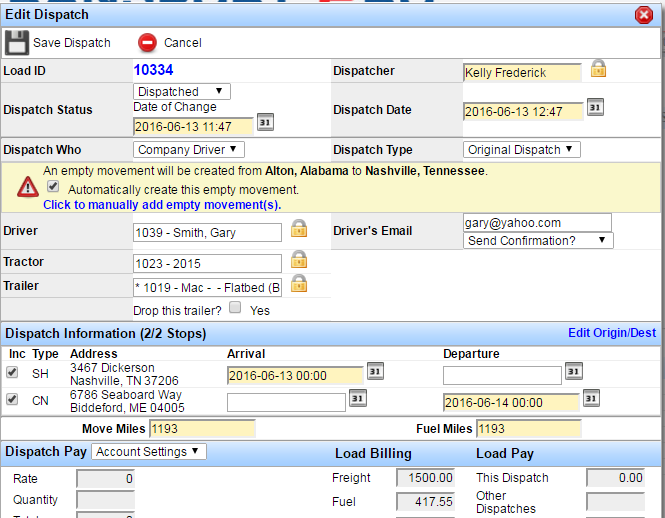
- Let's use the scenario above to see how the system prompts you to automatically add an empty movement.
As long as you leave the box checked, the system will automatically create the empty movement for you.
Add an Empty Movement
Empty Movements hauls a load from Tennessee to Alabama, and then hauls a second load from Tennessee to Maine, the system will detect that the driver is missing an empty movement from Alabama back to Tennessee.
Therefore, when you put the driver on that second load from Tennessee to Maine, the system will prompt you to add the empty movement automatically.
However, sometimes this gets overlooked, and you will need to add the empty movement manually.
Add an Empty Movement
- Let's use the scenario above to see how the system prompts you to automatically add an empty movement.
As long as you leave the box checked, the system will automatically create the empty movement for you.
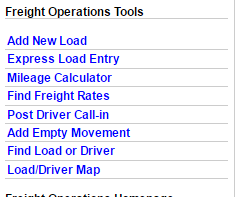
- If you need to manually enter an empty movement, you can do so with the Freight
Operations Tools menu on the Freight Operations Dashboard.
Click on the “Show Freight Operations Tools” link, and then click on the “Add Empty Movement Link.”
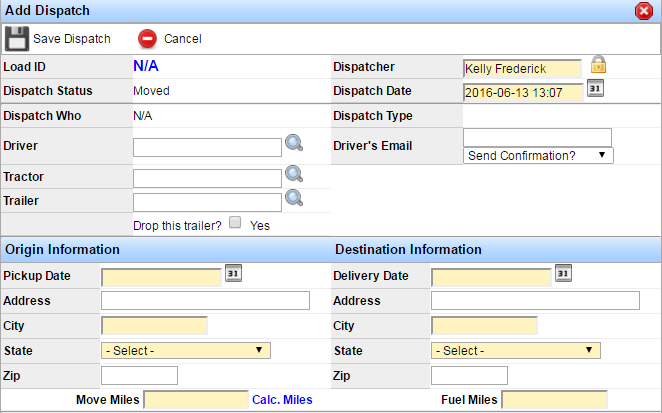
- An Add Dispatch window will open.
You will notice that if you are entering an empty movement, you will see “N/A” as the Load ID.
Enter the applicable information for the empty movement.
Click “Save.”
Dispatch Continuity Report
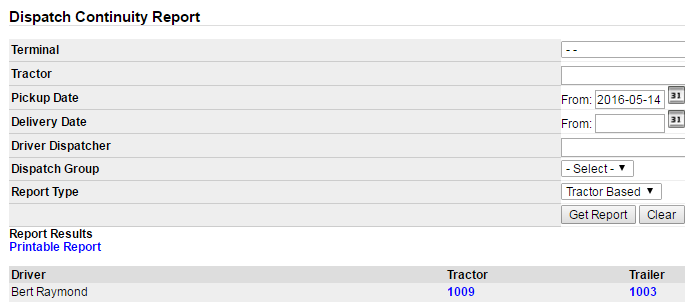
The dispatch continuity report in Transport Pro shows you all continuity issues that a driver or tractor has.
You can filter your search for continuity issues by terminal, tractor, pickup and delivery dates, dispatcher, dispatch group, and report type.
Once your results populate, you have the opportunity to add empty movements where needed.
By doing this, you can clean up your continuity report.
This report should be reviewed on a daily or weekly basis.
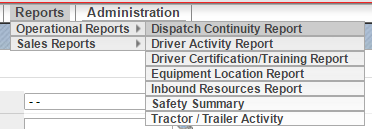
- Follow the path in the menu Reports > Operational Reports > Dispatch Continuity Report.
- A Dispatch Continuity Report window will open.
Enter the desired search criteria and click “Get Report.”
- When the results populate you will be presented with the driver, tractor, trailer, and number of continuity issues.
To review and edit these issues, click on the “Manage” icon to the right of the desired account.
- When you click on the icon, a “Dispatches” window will open.
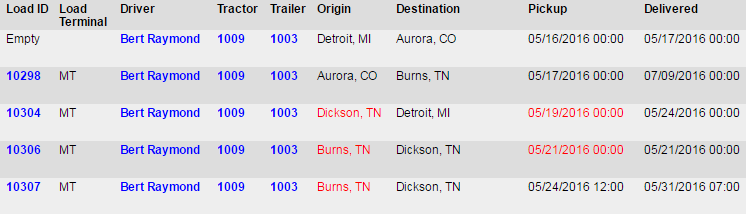
The red text indicates which loads have the continuity issues.
In the screen shot below, you can see that for load 10306 driver Bert Raymond picked up a load in Burns, TN on 5/21 and delivered it in Dickson, TN on 5/
- However, his next load (10307) picked up in Burns, TN.
The system detects that there should be an empty movement from Dickson back to Burns.
- Here, you have the opportunity to fix the continuity issue by adding an empty movement.
Using the example from step 4, we are going to add an empty movement from Dickson to Burns by clicking the “Add Empty Movement Before This Load” link.
Note: Be sure to click the blue hyperlink, not the paper icon.
The paper icon only allows you to edit the dispatch.
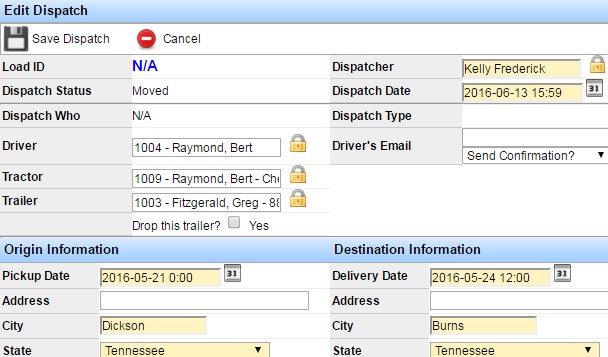
- When you click the hyperlink an Edit Dispatch window will open.
You can confirm that you are entering an empty movement when you see “N/A” as the Load ID.
You will also notice that the system has auto-inserted the correct information for you.
Using the example/screen shot from above, we can see that the system has determined that Bert Raymond should have an empty movement from Dickson to Burns.
Review the empty movement information, and edit if needed.
Click “Save.”
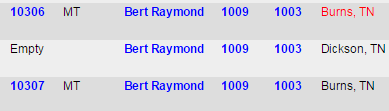
- You will now see that an empty movement has been added in the correct place on the continuity report.
Use the continuity report to add as many empty movements as needed, or edit a dispatch to fix any issues and clean up this report.